


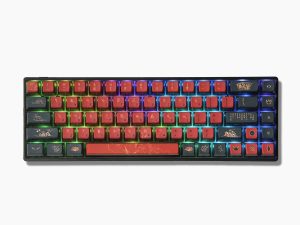


Best keyboard i have ever felt, everything about it is customizable, very user friendly, and over all, it feels like im touching straight diamonds, wonderful job skyloong. 💕

I can not put a finger on any aspect of keyboard and say it is a weak point of keyboard.
Feel is premium with aluminum body, sound is satisfying, encourage you to type more.
Excellent just shipping time and cost make less than ideal for urgent use cases.
Just it is a case with all the imports. (It was my first import. Mostly I buy from amazon etc)
I wish it was available of amazon.

It’s the best keyboard I’ve ever used, the typing feel is fantastic, it’s raised just right, it’s not very long, my open hand easily reaches the bottom of the keyboard.
Also these are the best materials I’ve ever seen on a keyboard: it’s heavy but that’s not a problem, it feels solid;
It’s extremely adjustable via software, and got some fabulous switches.
Well done Skyloong guys 🙂


My biggest problem with the Skyloong GK68 HE Aluminum is a mind-boggling oversight for what is supposed to be one of the best 2025 keyboards.
This keyboard has all the cutting-edge tech: Hall Effect (HE) switches, Rapid Trigger (RT), Dynamic Keystroke (DKS), TGL, MT, and SOCD settings, which should set a new standard for performance. However, it has one crippling flaw: zero user profile support.
I’m not referring to the basic physical game/office switch on the back; I mean the software/firmware ability to save and instantly load multiple, fully customized configurations.
The lack of profiles completely neutralizes the advanced features. The entire purpose of tuning DKS layers, RT sensitivity, and SOCD is to create specific setups—for example, a hyper-sensitive competitive FPS profile versus a dedicated Rhythm Game profile. Without the ability to save and swap, you’re essentially locked into one universal configuration that you have to tweak each time before playing the game you are planning to play.
I’ve confirmed this isn’t a simple case of me missing a setting; I have tried to find this functionality through both the web driver and the desktop app, and the issue is the same. The capability to save and load distinct user profiles is completely absent.
What makes this even more confusing is that the software includes a ‘share tab’ for users to share their settings. What is the point of having a community-sharing feature if you cannot save those imported settings (or your own) as a swappable profile?
It’s a massive failure in usability. A keyboard can be technically perfect, but if it’s functionally incomplete, it’s not worth keeping. I’m waiting on customer support to commit to adding robust profile management via a firmware update.

I received this keyboard as a giveaway prize, but I will still give an honest review. The keyboard itself is built really nice, the pre-lubed switches feel smooth and the sound is nice and thocky (with the skyloong switches). What really bothers me is the “software” by which I mean the website since I don’t want any bloatware on my PC. Nothing is explained at first which makes it frustrating to learn. By default the keyboard has a setting turned on which disables the last pressed key as soon as a new one is pressed (only for WASD I think), in my opinion this setting should be defaulted to be off since it is really annoying when playing rhythm games, which a lot people most likely do with HE keyboards. The BIGGEST annoyance on this thing would be TAB and Q, these two keys cant be modified at all and actuate at 0.1mm or so in gaming mode meaning the slightest nudge sets them off. Also there is no support for Linux what so ever and it seems as if Skyloong will not bother to support it in the future.

